Color correction
How to Fix White Balance in Final Cut Pro (Remove a Blue Cast)
Fix white balance in Final Cut Pro: drag the free White Balance Plugin onto your clip, use the White Selector eyedropper to click something that should be white, lower Auto Exposure Amount if it looks too bright, and copy the fix to other clips with Paste Attributes.
In this post
Quick answer: To fix white balance in Final Cut Pro, drag the White Balance Plugin from My FCPeffects in the Effects Browser onto your clip. In the Inspector, click the color swatch next to White Selector, choose the eyedropper in the Colors window, and click something in the shot that should be white. The color cast is gone. Best of all, the White Balance Plugin is free when you sign up with your email. The video below shows every step in under a minute.
Why footage turns blue (or orange)
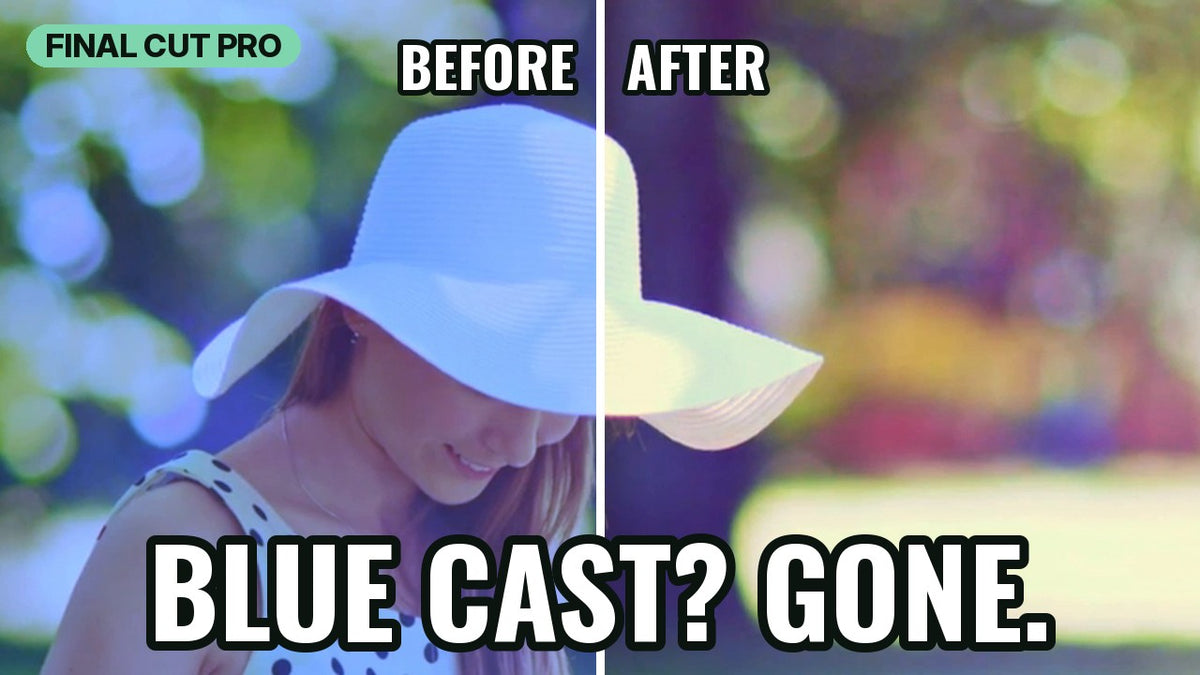
A camera has to guess what "white" looks like under the light it's in. When it guesses wrong, everything in the shot picks up a color cast: blue when it's set for warmer light than you shot in, orange when it's the other way around. In the clip in the video, the hat and the dress should look white, but they're clearly blue. Instead of pushing color sliders around until it looks right, you can tell Final Cut Pro what white is and let the plugin do the math.
Step-by-step: fix white balance with the White Balance Plugin
1. Add the plugin to your clip
In the Effects Browser, select My FCPeffects in the sidebar, and drag the White Balance Plugin onto your clip in the timeline. Select the clip so the plugin's controls show in the Inspector.
2. Pick something that should be white
In the Inspector, click the color swatch next to White Selector, then choose the eyedropper in the Colors window. Click something in the shot that should be white, like a hat, a shirt or a wall. The blue cast is gone.
3. Check the exposure
The plugin also adjusts exposure. If the shot looks too bright after you pick white, lower Auto Exposure Amount.
4. Fine-tune if necessary
Most shots are done at this point. If you want to adjust the look, you have temperature, tint, color balance, saturation, gamma, gain, fill and lift controls to fine-tune with.
5. Copy the fix to other clips
Shot a whole scene under the same light? Copy the fixed clip, select the other clips, and then choose Edit > Paste Attributes. Every clip gets the same correction.
Tips for accurate white balance
- Pick a true white. Choose something that really is white or light gray, not cream or beige, or you'll shift the whole shot.
- Avoid blown-out highlights. A pure white highlight has no color information left. Click a white area with a bit of detail in it.
- Toggle the effect on and off. Comparing before and after shows you exactly what changed.
- Match shots from the same setup. Paste Attributes keeps every clip from one location consistent.
FAQ
How do I fix blue footage in Final Cut Pro?
Add the White Balance Plugin to the clip, click the color swatch next to White Selector, and use the eyedropper in the Colors window to click something that should be white. The plugin removes the blue cast.
Is the White Balance Plugin really free?
Yes. It's normally $20, and it's one of three free Final Cut Pro plugins (with Ken Burns and Lens Flare) you get when you sign up with your email. No card needed.
Which versions of Final Cut Pro does it work with?
It works with all versions of Final Cut Pro from the last 5+ years, including Final Cut Pro 11 and the current Final Cut Pro 12, on Intel Macs and natively on Apple silicon.
Get the White Balance Plugin free
Enter your email on our free plugins page and we'll send you the White Balance Plugin, plus the Ken Burns and Lens Flare plugins. That's $60 of plugins for $0. You can also see the White Balance Plugin product page for more examples.
Want everything? The MEGA BUNDLE includes all of our plugins (over 80) for $80.