Workflow & tips
Final Cut Pro Plugins Not Showing Up? Turn Off the 4K and HDR Filters in Each Browser
Installed a plugin but can't find it in Final Cut Pro? The 4K and HDR search filters in the Effects, Transitions and Titles browsers are usually hiding it. Here's how to turn them off and where to look next.
In this post
You ran the installer, it said everything worked, and then you opened Final Cut Pro and the plugin was nowhere to be found. Most of the time, nothing is wrong with the install. The Effects, Transitions and Titles browsers each have the same 4K and HDR search filter setting, and when it is on it hides most plugins. This guide shows the quick fix once, then where FCPeffects plugins live, and what to do if a plugin still won't show up.
Key takeaways
- If a plugin installed but doesn't appear, check the 4K and HDR search filters first. They hide most plugins.
- It is the same setting in the Effects, Transitions and Titles browsers, so check all three.
- In each browser, click the magnifying glass next to the Search field, uncheck 4K and HDR, and clear any search text.
- Look in the My FCPeffects category, and make sure the Filter menu at the top of the browser shows Installed Effects.
- In the Titles browser, search only shows individual title names, not pack names, so browse My FCPeffects instead.
- Still missing? Download a fresh installer from your account, run it, and restart Final Cut Pro.
The problem: the install worked, but the plugin is missing
Here's what it usually looks like. The installer finishes without an error. You restart Final Cut Pro, open the Effects, Transitions or Titles browser, and the plugin isn't in the list. Sometimes the browser looks almost empty, or a category you know should be full looks nearly bare.
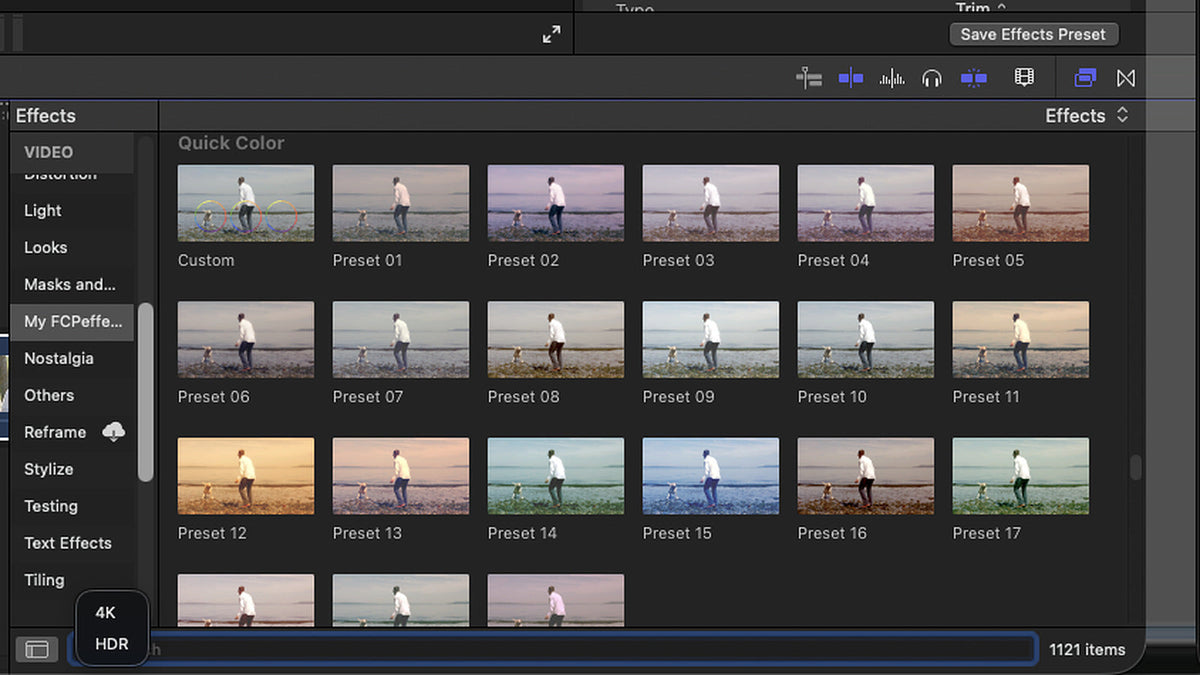
Look at the search field. If you see a small blue 4K or HDR tag inside it, a filter is on. Final Cut Pro is only showing items labeled as 4K or HDR, and most plugins don't carry those labels, so they're hidden.

Not every FCPeffects plugin is an effect. Some are transitions or titles, which live in their own browsers, so if you can't find a plugin in one browser, check the others.
The fix: turn off the 4K and HDR filters in each browser
- Open the browser where the plugin should be: Effects (click the Effects button at the top right of the timeline or press Command-5), Transitions (Control-Command-5), or Titles (Option-Command-1).
- Find the search field and click the magnifying glass on its left side. A small menu opens with 4K and HDR.
- If either one has a checkmark, click it to uncheck it. Do the same for the other, so neither is checked.
- Clear any text in the search field. Click the x at the right end of the field, or select the text and delete it.
- Repeat in the other browsers. The Generators browser has the same menu too.


As soon as a filter is off, the hidden items come back. In our example, unchecking HDR brought back some of the hidden effects, and unchecking 4K as well brought back everything.


The Transitions and Titles browsers have the same menu next to their search fields. Here it is in the Titles browser:

Where FCPeffects plugins live
Inside Final Cut Pro, our plugins show up in a category called My FCPeffects in the list on the left of each browser. Click it to see only FCPeffects items.
On your Mac, the installer puts the files in your Movies folder. Open Finder, go to your home folder, then Movies > Motion Templates, and look in:
- Effects:
~/Movies/Motion Templates/Effects/My FCPeffects/ - Titles:
~/Movies/Motion Templates/Titles/My FCPeffects/ - Transitions:
~/Movies/Motion Templates/Transitions/My FCPeffects/
If the plugin's folder is there, the install worked, and the problem is almost always a filter or search setting inside Final Cut Pro.
Searching for a title pack
In the Titles browser, search only shows individual title names, not the name of the pack they belong to. Searching for something like "Lower Third Pack 1" may not find it. Click My FCPeffects in the sidebar and browse instead.
Make sure the Filter menu shows Installed Effects
At the top of the Effects Browser there's a Filter pop-up menu. It should say Installed Effects (the Transitions, Titles and Generators browsers have the same menu). That's the default, and it shows everything installed on your Mac. If it's set to a library instead, Final Cut Pro only shows Motion content stored in that library, so newly installed plugins won't appear. Apple explains this in Add video effects in Final Cut Pro for Mac.
Still missing? Download a fresh installer
If the filters are off, the search is clear, and you're in the right browser, reinstall with a fresh download:
- Log in to your FCPeffects account and download the plugin again. It's free. (Need help logging in? See Download again, update or move to a new Mac.)
- Use the new download, not an installer you saved a while ago. Older saved installers may be out of date.
- Run the installer, then quit Final Cut Pro completely (Command-Q) and open it again.
Still stuck? Send us screenshots
We're happy to help. Contact us and include the plugin name, the email address you ordered with, and screenshots of:
- The My FCPeffects category in the Effects Browser
- The My FCPeffects category in the Titles browser
- The My FCPeffects category in the Transitions browser
- The
~/Movies/Motion Templates/Effects/My FCPeffects/folder in Finder - The
~/Movies/Motion Templates/Titles/My FCPeffects/folder in Finder - The
~/Movies/Motion Templates/Transitions/My FCPeffects/folder in Finder
Press Shift-Command-5 to take a screenshot on your Mac. With those six pictures we can usually see the problem right away.
FAQ
Why are my Final Cut Pro plugins not showing up after I installed them?
The most common reason is that the 4K or HDR search filter is turned on in the Effects, Transitions or Titles browser. Those filters hide anything that isn't labeled as 4K or HDR, which includes most plugins. In each browser, click the magnifying glass next to the Search field, uncheck 4K and HDR, and clear any search text.
What do the 4K and HDR options in the Final Cut Pro search menu do?
They narrow the Effects, Transitions, Titles or Generators browser to items labeled as 4K or HDR. When either one is on, a small blue 4K or HDR tag appears in the search field and the item count in the corner of the browser drops.
Where are FCPeffects plugins installed on my Mac?
In your Movies folder, under Motion Templates. Effects go in Effects > My FCPeffects, titles go in Titles > My FCPeffects, and transitions go in Transitions > My FCPeffects. In Final Cut Pro they show up in the My FCPeffects category of each browser.
Why can't I find a title pack when I search for its name?
In the Titles browser, search only shows individual title names, not the name of the pack they belong to, so searching for something like "Lower Third Pack 1" may not find it. Click My FCPeffects in the sidebar and browse instead.
Do I have to buy a plugin again to reinstall it?
No. Log in to your FCPeffects account and download it again for free, then run the new installer and restart Final Cut Pro. Use a fresh download rather than an old installer you saved, so you get the latest version.